geetest极验点选验证码位置识别
前言
重拾blog, 说实话还是会有很多不习惯, 写一篇blog成本其实还是挺大的, 特别是想要开源一些东西的时候, 要准备的东西太多了, 自己用怎么都行, 但是开源的话, 就像自己使用的时候, 总希望体验好一点, 也希望别人能快速验证是否满足自己的需求.
背景
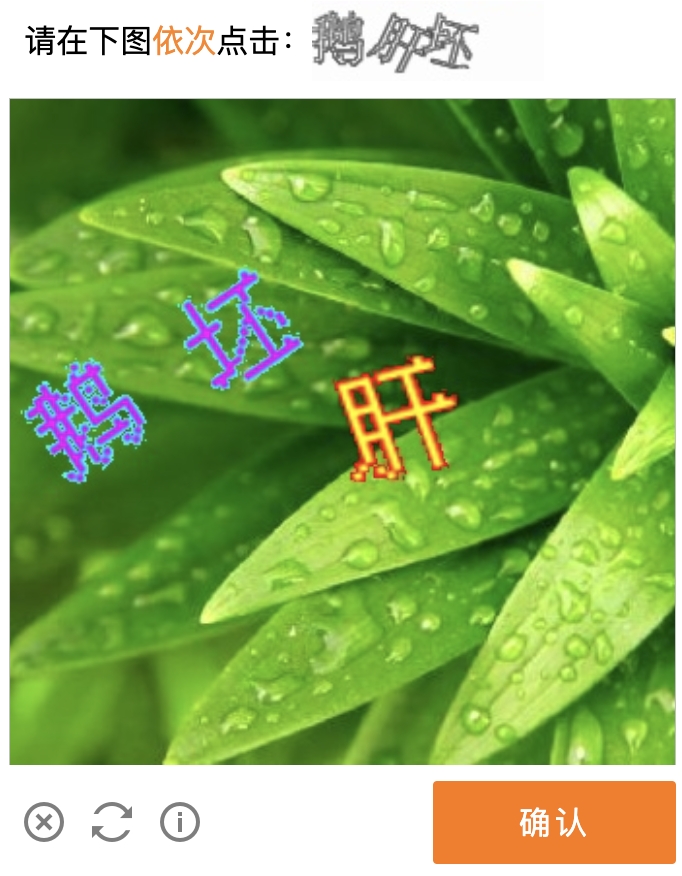
之前通过 Puppeter 自动登录B站, 那会是极验的滑动验证码, 那个相对来说还简单一点, 毕竟核心是定位缺口, 定位到缺口, 后面就是正常的鼠标模拟滑动, 缺口定位的话方案其实还是挺多的, 然后走 Puppeter 模拟滑动即可, 之前搞定了, 然后最近发现自动登录失效了, 检查了一下之后发现滑动验证码更新了, 换成了点选验证码
 极验点选验证码
本着极速解决不造轮子的想法, 搜索了一把, 居然没有相关的成熟可靠解决方案, 想了一下, 事情还得解决, 那就自己实现一个吧.
思路其实还是有的, 之前其实就用过好几次 ddddocr 这个python库, 而且里面的demo就有这个, 所以准备整合一下.
 原始图片 上面这个是原始图片, 首先当然是目标检测, 找到具体的文字区域, 一个是待点击的左下角区域的文本, 另外一个则是主体部分需要找到对应的文本,最后通过OCR匹配到具体坐标.
1
2
3
4
5
6
7
8
9
10
11
12
13
14
15
16
17
18
19
20
21
22
23
24
25
26
27
28
29
30
# 这是目标检测
import ddddocr
import cv2

det = ddddocr.DdddOcr(det=True)

with open("test.jpg", 'rb') as f:
    image = f.read()

poses = det.detection(image)
print(poses)

im = cv2.imread("test.jpg")

for box in poses:
    x1, y1, x2, y2 = box
    im = cv2.rectangle(im, (x1, y1), (x2, y2), color=(0, 0, 255), thickness=2)

cv2.imwrite("result.jpg", im)

# 这是OCR
import ddddocr

ocr = ddddocr.DdddOcr(beta=True)

with open("test.jpg", 'rb') as f:
    image = f.read()

res = ocr.classification(image)
print(res)
但是呢, 实际测试下来, 目标检测其实还是很准的, 基本上能够定位到具体的为止, 但是呢OCR精准度还是有点欠缺的, 这个当然是可以训练的, 具体训练姿势可以参考ddddocr的文档, 之前用官方的训练过一个加减法的验证码, 效果还是很不错的, 因为默认的模型, 他-, +, x 和 ? 识别经常出错, 当然这个case其实也不需要训练, 因为都是一位数, 所以第2位 肯定是 + - x, 第4和5位肯定是 =? , 所以代码加一写兼容处理, 可以不训练直接处理. 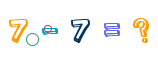 这里依旧还是不训练, 因为准备训练集还是挺累的, 2000的样本, 还需要标注好具体的字, 工作量还是很大的, 我当前的场景要求没这么高, 所以就不这么折腾了.
具体思路
极验点选我测试下来基本上都是2-4个字
- 2个字, 这个其实比较简单, 2个字全匹配最简单, 1个字匹配, 另外一个默认匹配, 0个字匹配, 这个时候就默认顺序吧, 赌一个概率, 反正可以重试.
- 3个字, 同理, 3个字和2个字匹配其实都是全匹配, 1个字或者0个字, 我现在默认就当匹配失败, 其实也可以随机匹配.
- 4个字, 测试下来, 识别成功率有点低, 所以默认就当匹配失败.
所以最后代码就是这样的
1
2
3
4
5
6
7
8
9
10
11
12
13
14
15
16
17
18
19
20
21
22
23
24
25
26
27
28
29
30
31
32
33
34
35
36
37
38
39
40
41
42
43
44
45
46
47
48
49
50
51
52
53
54
55
56
57
58
59
60
61
62
63
64
65
66
67
68
69
70
71
72
73
74
75
76
77
78
79
80
81
82
83
84
85
86
87
88
89
90
91
92
93
94
95
96
97
98
99
100
101
102
103
104
105
106
107
108
109
110
111
112
113
114
115
116
117
118
119
120
121
122
# -*- coding: utf-8 -*-
import urllib.request
import copy
import cv2
import ddddocr
import flask
import json
import numpy as np

server = flask.Flask(__name__)

det = ddddocr.DdddOcr(det=True, show_ad=False)
ocr = ddddocr.DdddOcr(beta=True, show_ad=False)


def get_match_result(target, source):
    output = [None] * 2
    keys = list(source.keys())

    if len(target) == 2:
        match_size = 0

        for i in range(len(keys)):
            if target[i] in source and source[target[i]]:
                match_size += 1
                output[i] = source[target[i]]

        if match_size == 0:
            output[0] = source[keys[0]]
            output[1] = source[keys[1]]

        if match_size == 1:
            remaining_key = keys[0] if len(keys) > 0 else None
            if not output[0]:
                output[0] = source[remaining_key]
            if not output[1]:
                output[1] = source[remaining_key]

    if len(target) == 3:
        output = [None] * 3
        match_size = 0

        for i in range(len(keys)):
            if target[i] in source and source[target[i]]:
                match_size += 1
                output[i] = source[target[i]]

        if match_size == 1:
            output = [None] * 3

        if match_size == 2:
            remaining_key = keys[0] if len(keys) > 0 else None
            if not output[0]:
                output[0] = source[remaining_key]
            if not output[1]:
                output[1] = source[remaining_key]
            if not output[2]:
                output[2] = source[remaining_key]

    coords = [None] * len(output)

    for i, v in enumerate(output):
        if v:
            coords[i] = [(v[0] + v[2]) / 2, (v[1] + v[3]) / 2]

    return coords


def process_image(image_data):
    np_array = np.frombuffer(image_data, np.uint8)
    image = cv2.imdecode(np_array, cv2.IMREAD_COLOR)

    order = image[344:384, 0:150]
    _, order = cv2.imencode('.jpg', order)
    target = ocr.classification(order.tobytes())

    new = copy.copy(image)
    new[340:390, 0:400] = (0, 0, 0)
    new = cv2.imencode('.jpg', new)[1]
    poses = det.detection(new.tobytes())

    source = {}
    for box in poses:
        x1, y1, x2, y2 = box
        part = image[y1:y2, x1:x2]
        img = cv2.imencode('.jpg', part)[1]
        result = ocr.classification(img.tobytes())
        if len(result) > 1:
            result = result[0]
        source[result] = [x1, y1, x2, y2]

    return target, source


@server.route('/geetest_click', methods=['GET'])
def geetest_click():
    image_url = flask.request.args.get('image_url')

    try:
        with urllib.request.urlopen(image_url) as response:
            image_data = response.read()
        target, source = process_image(image_data)

        return {
            'target': target,
            'source': source,
            'coords': get_match_result(target, source)
        }
    except Exception as e:
        return {
            'error': str(e)
        }, 500


@server.errorhandler(500)
def handle_error(e):
    res = {"error": "服务器内部错误"}
    return json.dumps(res), 500


if __name__ == "__main__":
    server.run(port=9991, host='0.0.0.0', debug=False)
大概逻辑就是目标检测文字区域, 然后分别OCR识别, 然后匹配待点击区域和识别区域的文本, 最后给出点击坐标.具体源码在 geetest, 不会写python, 所以代码比较丑, 但是能用, python在某些领域是真的强, 强到离谱.
同时我也搭建了一个demo, 方便测试, 你要找到geetest的验证码图片
1
2
# image_url geetest的验证码图片 地址
curl http://38.147.170.248:9990/geetest_click?image_url=https://static.geetest.com/captcha_v3/batch/v3/46335/2023-09-07T15/word/270a3da4a8eb4e66a014de56300073dd.jpg
返回的数据
1
2
3
4
5
6
7
8
9
10
11
12
13
{
    "coords": [
        [49, 114.5],
        [148.5, 170],
        [196, 79.5]
    ],
    "source": {
        "e": [164, 48, 228, 111],
        "发": [115, 137, 182, 203],
        "德": [14, 80, 84, 149]
    },
    "target": "德发长"
}
一共是3个数据
- target: 识别出来待点击区域的文本.
- source: 识别区域的文本以及坐标
- coords: 最终实际文本顺序的中心相对坐标.
有这份数据之后, 配合Puppeter那么就毫无难度了!
使用方法
建议自己单独部署, 虽然这个没有隐私数据, 可以直接使用我上面部署的demo, 但是别人的东西毕竟不稳定, 所以还是建议自己个人部署.
1
docker run -d --name geetest -p 9990:9991 zscorpio/geetest:v0.0.1
记得放开防火墙端口